Twitter has proved its dominance in the internet with in a short period. It has become popular among millions of people around the world. They use Twitter like their mobile phones to send messages and that for free. It provides internet users a great oppurtunity to share their deeds with their friends, family, and the world.

Twitter is a efficient and free messaging tool, which sometimes in the future may replace even e-mails. Time may come that some may ask your Twitter ID so that he can follow you or sent you tweets. This is a great thing in the information exchange point of view, but there are lot of buisness and branding possbilities with Twitter too. Many popular companies have started their own Twitter accounts and share tweets with the world. They see this as an oppurtunity to increase their brand popularity and reach millions of common people around the world at the same time.
We know how much RSS feed have helped bloggers to improve their blog popularity and your feed count is the proof of your blog success and search engines give lot more importance to your feed count while ranking your blog in their list. The time has gone, when you have to post your blog address at forums and request websites to place links in their websites. There is no need for such things now. There are many other ways before us now. You can list your blogs in blog search engines or blog directories, bookmarklets and now you have one other way to increase the popularity of your blog and make it a brand, and that is by using Twitter.
Twitter has opened another oppurtunity for bloggers to start attracting more users to their blog. What you have to do is tweet about the contents of your blog, about your blog, about yourself, and latest happenings in topics that relates to the content of your blog. It will help the world notice your blog so easily and fast. You might have seen the "Follow me at Twitter" button in many websites. So some day it is possible that RSS feeds may be replaced by this button.
There are many advantages using Twitter than many other services, it offers direct communication among followers and tweeters. It offers dynamic traffic to your site. If some of your followers like your blog or its content they will re-tweet it. In this way you get more traffic without doing anything. Twitter will help you create a brand image for your blog. All you have to do is to start a twitter account with the name of your blog. Another thing is that you can create any number of twitter accounts and manage them easily from your desktop. The most important thing is that it allows you to communicate with your followers, know what they are accepting, take ideas from them, and build a strong relationship with your readers. Many top websites have opened their twitter accounts and already have thousands of followers. So why are your waiting. Start your own
Twitter account for your blog and boost your blog traffic.
Yahoo! Shortcuts is a new plug-in that will help you improve the quality of your blog posts by suggesting you photos, maps, quotes, headlines, and much more related to your blog posts. is plug-in is available only for Wordpress now and will be available for other platforms in the near future.
 Relevant Shortcuts
When you write you blog post Yahoo Shortcuts will suggest you relevant content related to that post by searching in websites like Flickr for photos and other websites on the internet for news, products, people, places, and lot more. You can enhance and add more depth to your posts using the content suggested by Yahoo Shortcuts. The shortcuts found by Yahoo Shortcuts will be underlined. You can add these shortcuts to your blog posts and customize the way a shortcut looks in your blog post. If you think a particular shortcut is not relevant you can delete it.
 Adding Images
Adding images to your blog posts can be made easy with Yahoo Shortcuts. As you write your post Yahoo Shortcuts will search and find relevant images for your post from Flickr. You did not have to manually search and find images. You can then select the appropriate image and add the image link to your post. You can also determine the size, width, and alignment of the image.
Yahoo Shortcuts is an amazing plug-in which is a boon to bloggers and help them to improve the quality of blog posts. It is also beneficial for the readers because they got more relevant information while reading a single post.
Want to make your blog more attractive and interactive. The best thing you can do is to embed some games to it. That will definitely make people stay in your site for some long time.
Heyzap is a flash game publishing site that allows game developers to create, and share games through a blog or a website. What you have to do is to upload your flash game by creating a widget and then specify its height, width etc. Then the game will be evaluated by Heyzap and if it is approved you get the URL and the code to embed the game in your website or blog.
The games are well categorized. Publishers of games will find it so easy to submit their games here. They can also generate extra cash because Heyzap offers revenue sharing for the pre-roll video ads. It also offers a nice dashboard through which developers can track the game usage and its popularity.
For bloggers they can be able to attract and hook more readers to their sites by posting game links from Heyzap.
heyzap.com - embed games
Labels:
best blogging clients,
Blogdesk,
Blogging,
blogging clients,
blogjet,
ecto,
Flock,
Live Writer,
Qumana,
Scribfire,
Social browser,
Zoundry
Blogging is very popular now a days. Blogs are the free and best platform to share your ideas with the world. So it is time to think seriously about some offline blog editors that will help you to write blogs, edit, and post them. Here is a list of the best blog editing tools that can make your blogging more fun and easy.
1.
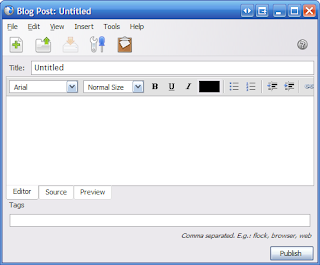
Flock: Flock is the best offline editor available now. It can be used as a browser/blog editor. It can be considered as a social browser that is designed to fulfill your social networking, blogging, and browsing needs. You can use Flock as your Blog client. It is an excellent offline blogging client that works with all major blogs sites like LiveJournal, Blogger, Wordpress, and a wide range of other platforms including Metaweblogs. Due to this universality it can be considered as the best offline blogging client. Creating and posting blogs with Flock is so easy. Install Flock, and when you run it for the first time, you will be prompted to enter the URL of your blog, User name, and password to log in to your blog. Enter those details correctly and you are all set to go.
A cool feature of Flock is the "Blog This" feature. If you see some interesting content or a photo, or anything else so interesting just right click on it and Select "Blog This" to instantly post it to your blog. There are a lot of cool features that Flock has and you can explore it to learn more about Flock.
 BlogDesk
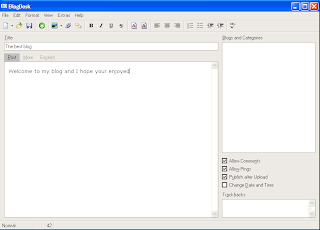
: Another great offline blogging tool you can use and it is free. You can use this to easily post your blogs. But I think it is not as flexible as Flock. The striking features of this tool is that it has a good tag editor. You can add your tags to a list and whenever you want to add a tag to your posts, you can add it from the list. It has a spell checker! The spell checking is a useful feature. I think configuring it is a bit tough. To configure BlogDesk you have to select File> Manage Blog. There are two ways to upload images via BlogDesk. First you can directly upload images which is the easiest way and the second method is to use FTP protocol. You can edit your images within BlogDesk because it offers basic image editing features like cropping, rotating, and changing file formats etc. Some other features of note are that BlogDesk allows you to edit already posted blogs. Then it has a auto save feature which will automatically save your post in a folder locally so that you did not have to take a backup of your blogs.The only down side is that it did not support a lot of blog platforms. Actually I cannot find the name of Blogger in the supported blog list. But it definitely worth a try.
 Live Writer
: Live Writer is a cool blogging client from Microsoft. But installing it is a bit tricky for me. When I clicked on the install button I see a message that I have to upgrade my installer. So make sure you have updated your system with the latest Windows installer. A nice article to solve installation problems for Live Writer is available
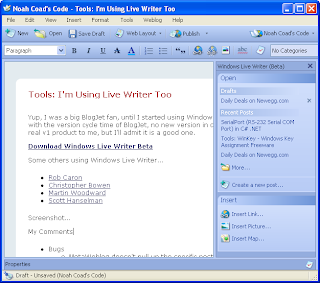
here. Liver Writer is free to use and offers a bunch of features to make your blogging more efficient. It is so easy to use Live Writer because it has a lot of nice features that makes your blogging easy. You can create posts exactly the way it looks in a web browser. This is because Live Writer will download a copy of the CSS style you are using in your blog and keep a local copy of it. The next feature that I noted is that it allows you to add maps to your post via Windows Live Local. Live Writer has an auto correct option and it also can automatically save your post as drafts. It allows tabbed blogging. That is you can create more than one blog at a time. Each post appears as a tab. The image editing features of Live Writer worth mentioning because it provide you with some basic image effects that is very helpful to add image effects to your images. You can also add videos, podcast etc to your blog. The only downside is that the preview is rendered exactly the way it looks in IE! The software is in its beta now. So it is not a completely stable version. Sometimes after this beta we will have to wait and see if it remains free or become commercial or become a part of Microsoft Office suite. So grab it now!
 Qumana
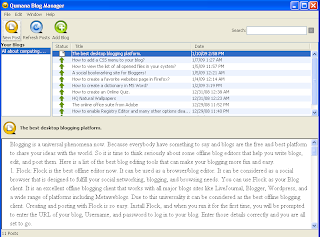
: A nice blogging tool you would use especially if you are a beginner and still learning how to post blogs using offline clients. It has a nice interface and so it is very easy to learn. Then it has all the features you expect from a blogging client. When you run it for the first time, it will prompt you for your blog address. Just type in your address, User name and password. Qumana will automatically configure everything for you. This is a feature that is of great help. Creating posts with Qumana is also easy. Another feature it possess is that it gives you the opportunity to monitonize your blog using QAds. You can sign up for QAds and insert ads in your posts. Then it has a blog manager which helps you to manage your posts quickly. In the Blog Manager window you can see the number of blog posts and you can preview, edit, publish, and republish posts. But it is a bit slow. It is a cross platform tool, that may be the reason. It is noticeably slow when you spell check your post. Above all it is one of the best blog editors I ever know.
w.blggar: It is a fantastic blogging tool that works well with Windows operating system. It is a good replacement for Live Writer! Because Live Writer is in beta there may be some stability issues, because Quamana is Cross Platform it has some problems running in Windows. So the tool that you have to watch out for is w.blggar. When you launch w.bloggar for the first time, the configuration window will appear where you have to select a platform and enter an alias for your blog. Then you have to enter User name and Password of your blog and press Finish button to complete the installation process.But creating posts is not easy for novices because w.bloggar did not have a WYSIWG feature. It instead has a text editor. It supports HTML syntax highlighting. Unfortunately it did not support tags. It also did not have an image editor. Truly not for novices. But it is quiet stable and almost never crashes. It also has good blog backup feature. It also has powerful FTP uploading features that definitely worth a mention. It supports a wide number of platforms. It is a tool apt for a pro-blogger.
 Zoundry
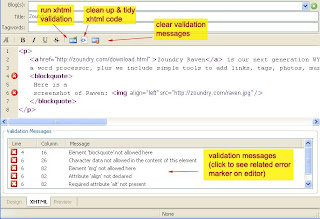
: Zoundry is another blog editor that you can give a try. It is one of the best blog editors both in case of usability and functionality. After you have properly configured Zoundry you can start creating your blog. I will mention quickly some of the features I like the most about Zoundry. It has an intelligent tag completion feature as you see in website design tools like Dreamweaver. So you will love using HTML scripts while creating posts with Zoundry. The auto complete list includes both XHTML and CSS keywords. It has Design, XHTML, and Preview modes. You can create multiple blog profiles in Zoundry. It also supports a large number of blogging platforms. It also offers good blog back up features. It is highly extensible with plug-in support. All you have to do is to visit Raven Zoundry site and download plug-ins you need. Then extract and copy them to your Zoudry installation folder. Then there is a blog profile manager and good tag support. Lot of cool features you can explore and find. Amazing tool that worth a try!
Do not want any of these tools just log in to your blog account and create post there. Alternatively, you can also use MS Word which support blog creation and posting. You can also use
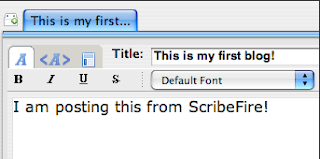
ScribFire which is a Firefox plug-in for blogging. It gives you the comfort of blogging inside Firefox. There are commercial alternatives also like
BlogJet and
ecto.
I hope you enjoyed the post!
You want to tell a lot of things through a blog. You probably give labels to your blogs so that people can click on those labels to go to the posts related to that label. They can also navigate using the blog archive in your blog. But as your blog becomes bigger and bigger it may contain lot of labels and archives and you find it more difficult to manage them.
The user who visits your site also found it too difficult to find what he want. So you can give your visitors an idea about the topics you are blogging about by adding a menu to your blog. If you are blogging about Linux then you can add menu items like News, Tips and Tricks, Softwares, Resources etc. By clicking on these links they can easily navigate to each section in your blog. This adds more professionalism to your blog and it also make your blog more easy to navigate.
I will tell you how to add a CSS based menu in your blog. First what you need is an image that can be used as the menu. You can use this image.

Upload your image to a free image hosting service like
Picasa web albums. Then copy the URL of this image and paste it in a notepad file because you need it to continue this tutorial.
You now have successfully hosted your image and have the URL of it with you. Now we are going to add the CSS script to your blog. I think you all know what CSS is. It is used to add styles to web documents. It is used to format images and text contained in a webpage. So we have the image and its URL. We have to format this image using CSS and add it to our blog. Here is the CSS script that we are going to use.
#tabsH { float:left; width:100%; background:#000; font-size:93%; line-height:normal; } #tabsH ul { margin:0; padding:10px 10px 0 50px; list-style:none; } #tabsH li { display:inline; margin:0; padding:0; } #tabsH a { float:left; background:url("tableftH.gif") no-repeat left top; margin:0; padding:0 0 0 4px; text-decoration:none; } #tabsH a span { float:left; display:block; background:url("tabrightH.gif") no-repeat right top; padding:5px 15px 4px 6px; color:#FFF; } /* Commented Backslash Hack hides rule from IE5-Mac \*/ #tabsH a span {float:none;} /* End IE5-Mac hack */ #tabsH a:hover span { color:#FFF; } #tabsH a:hover { background-position:0% -42px; } #tabsH a:hover span { background-position:100% -42px; }It is time to add this script to your blog. So first login to your blogger account. Now click on the Layout tab and select Edit HTML. This will show you the HTML code of the template of your blog. You are going to edit this template. So make sure that you take a backup of the current template.
Press CTRL+F and enter the following lines in the Find search box.
Now enter the CSS script just above this line. Replace "tabrightH.gif" in the CSS script with the exact URL of the image. Click on the Save Template button to save changes to your blog template.
The next step is to add HTML script for this menu. To do that once again you have to click on the Layout tab. You have to select the "
Add a Gadget" option. From the list that appears select
HTML/JavaScript. Now place this Gadget just below your blog header image. Click on the Edit link to add HTML script to this Gadget. Here is the HTML script you are going to add.
Now you have to add some links to the "#" section in this script. I think you have labeled all the post in your blog. So replace this section with "http://youblog.blogspot.com/search/label/
lablename". Replace label name with a label you have used in your blog. Say, if you have a blog about Linux and you labeled some posts with "TipsnTricks" then replace
labelname with TipsnTricks. Replace Link1, Link 2, Link 3, Longer Link Text, Link 5, Link 6, and Link 7 between the
opening and closing span section with the names you want to give to these links. Click on Save button to save your changes. Also save changes to your template.
You have successfully added a CSS menu to your blog. Visit
exploding boy website for more CSS menus and scripts.
I hope you enjoyed this post!
Social bookmarking is a great way of finding new websites on the web for web surfers. It also is a way to proclaim the world that I have a site or blog and attract more traffic to it.
Digg, Stumble Upon, Del.ico.us are examples of some sites that allow you to bookmark websites. Now a new site has arrived which allow bloggers to bookmarks their blogs, comment on blogs etc. YouBlogged.com is a social bookmarking site, but it is for bloggers. It is more or less similar to those Diggs and Dels but aimed at the blogosphere.

The site has just started and is quite new that there is only a meager content that you can find here. Since it is a social bookmarking site and more than that, a blog bookmarking site it is up to you, bloggers to bookmark their favorite blogs. The site is well organized and each to navigate with lot of categories like Arts, Science, Crafts and so on. There is a cool bookmarklet feature too.
To start with you have to create an account with YouBlogged.com. While creating an account you have to enter your blog address along with other details like email address and all. Since it is a new site at first I do not think it worth a try. But as time goes on I think you will benefit a lot. It is not just a bookmarking site; it is where a blogger can promote his blog, share his thoughts, ideas, evaluate the popularity of a blog. A user can rate a blog, browse blogs based on categories, and subscribe to categories to topics of his interest.
Overall it is a nice site that has a great purpose and a boon for bloggers who are always looking for ways to promote their blog. This one is for you and you will definitely benefit from it in the long run. To sign up with YouBlogged.com click
here.


