
The photoshop "License is Expired" error message is an error message that you will get when you legally or illegally try to activate Photoshop CS3. Even if you have successfully installed Photoshop CS3 with the correct Key and activated it successfully you will get this error message. I have a simple solution to this problem. Follow the steps below to resolve this error message. This tip is just for the users you have activated Photoshop CS3 with a key. Otherwise you will have to activate Photoshop with a key to follow these instructions.
1. Run Photoshop CS3 just to make sure that the error is not resolved!
2. Now go to Start > ContolPanel > Date and Time.
3. Set the system clock time to something like January 5 2006.
4. Restart your system.
5. Start Photoshop CS3 again.
Now I think your problem will have been resolved. This is a genuine crack for License is Expired error in Photoshop. I hope this tweak will work for you.
Showing posts with label Tips and Tricks. Show all posts
Showing posts with label Tips and Tricks. Show all posts

Firefox has a nice bookmarking feature integrated with it. Using this you can easily bookmark your favorite websites. But as the list becomes bigger and bigger you find it very difficult to maintain. So the best thing you can do is to just create a WebPage that links to all your favorite pages you have bookmarked with Firefox. You can automate the task with Firefox. Here is how to create a webpage to access your favorite sites using Firefox.
1. Open Firefox and navigate to Bookmarks menu.
2. Select "Organize Bookmarks" option. This will open up the Bookmarks Library window.
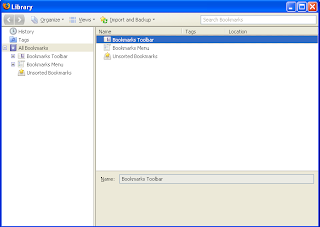
3. Click on "Import and Backup" icon.
4. A pull down menu will appear and from that menu select "Export to HTML" option.
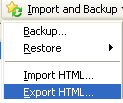
5. Save the HTML file with a name you like.
You have successfully created an HTML version of your Bookmarks. So the next time you want to visit your favorite bookmarks, you can open this webpage and click on the links to access them.The advantage of exporting your favorite bookmarks is that you can make sure that your hard earned bookmarks will not be lost when you reinstall Firefox or due to software crashes. After reinstalling you can import those bookmarks by clicking on "Import and Backup" menu and selecting "Import HTML". Also you can import these bookmarks to Opera or IE.
I hope you enjoyed the post!
1. Open Firefox and navigate to Bookmarks menu.
2. Select "Organize Bookmarks" option. This will open up the Bookmarks Library window.

3. Click on "Import and Backup" icon.
4. A pull down menu will appear and from that menu select "Export to HTML" option.

5. Save the HTML file with a name you like.
You have successfully created an HTML version of your Bookmarks. So the next time you want to visit your favorite bookmarks, you can open this webpage and click on the links to access them.The advantage of exporting your favorite bookmarks is that you can make sure that your hard earned bookmarks will not be lost when you reinstall Firefox or due to software crashes. After reinstalling you can import those bookmarks by clicking on "Import and Backup" menu and selecting "Import HTML". Also you can import these bookmarks to Opera or IE.
I hope you enjoyed the post!
Subscribe to:
Posts (Atom)

